Documentation Index
Fetch the complete documentation index at: https://docs.hanko.io/llms.txt
Use this file to discover all available pages before exploring further.
Hanko Supabase Integration Guide
About Hanko:Hanko is a modern open source authentication solution and the fastest way you integrate passkeys, 2FA, SSO, and more—with full control over your data. Move between self-hosted and Hanko Cloud anytime. No lock-in. Just Auth how it should be: secure, user friendly, and fully yours.What This Guide Covers: This guide demonstrates how to integrate Hanko authentication with Supabase database. You’ll learn to automatically sync user data between Hanko and Supabase, creating user profiles and managing authentication state across both platforms.Key Technologies:
- Hanko Elements (Authentication)
- Supabase (Database & Backend)
- Next.js (React Framework)
- TypeScript
- Supabase JavaScript Client
- Database Schema Design
Prerequisites:
- Basic knowledge of React/Next.js
- Understanding of database concepts
- Node.js development environment
- Active Hanko project configured
- Supabase account and project
Tasks You’ll Complete:
- Set up Supabase project and database
- Create users table with proper schema
- Configure Supabase client in your application
- Build API endpoint for user synchronization
- Integrate user sync with Hanko authentication
- Test user creation and data flow
This guide uses Next.js, but you can apply the same concepts to other frameworks or languages. We’re expanding our framework examples, so stay tuned for more!
Create Supabase account
Sign up for a Supabase account if you don’t have one already. Create new project
From the Supabase dashboard, click ‘New Project’ to create a project for your application. Create users table
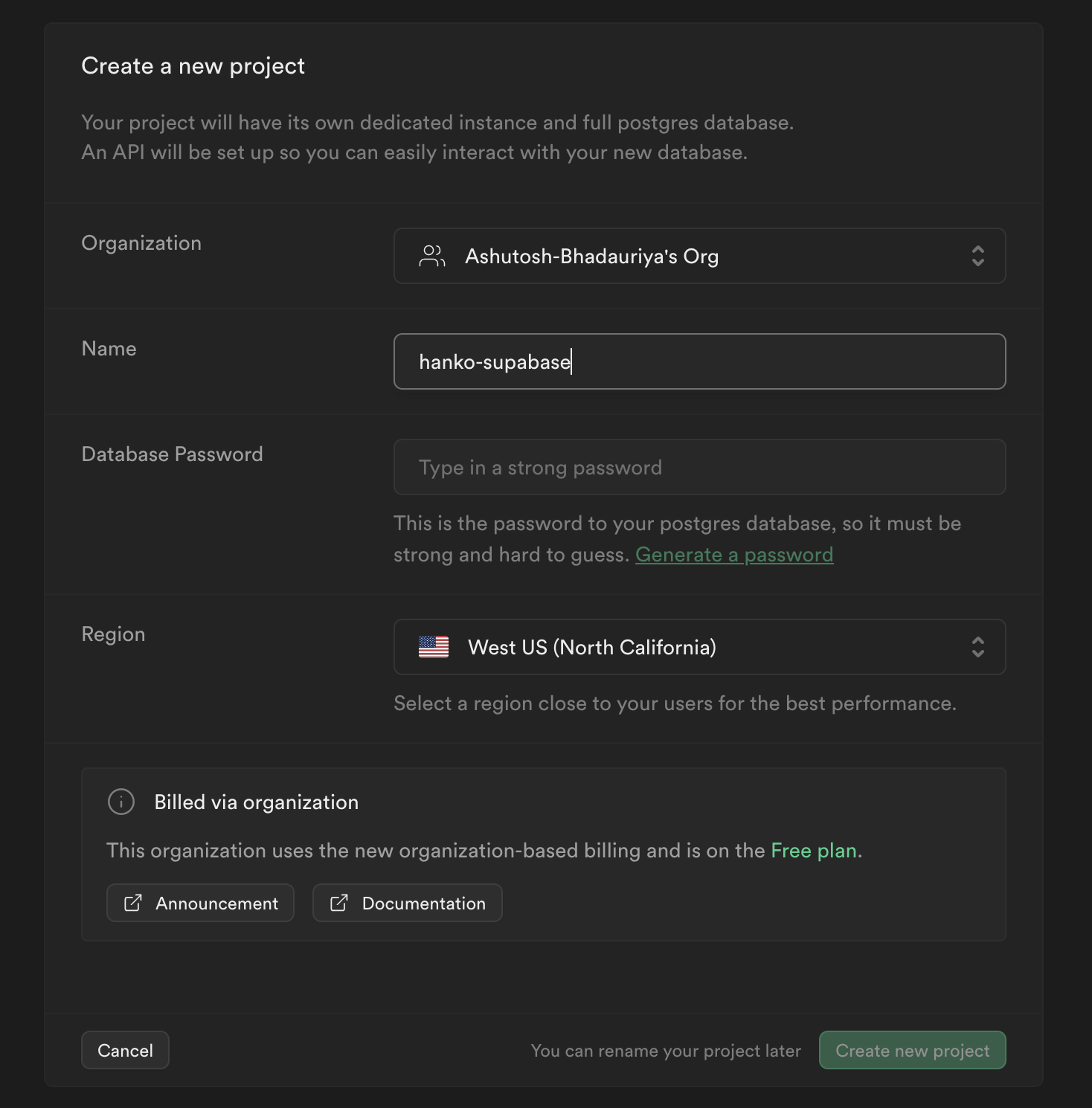
In your project dashboard, navigate to ‘Database’ and create a new ‘users’ table.
This table will store user information from Hanko. Add these columns beyond the default ‘id’:
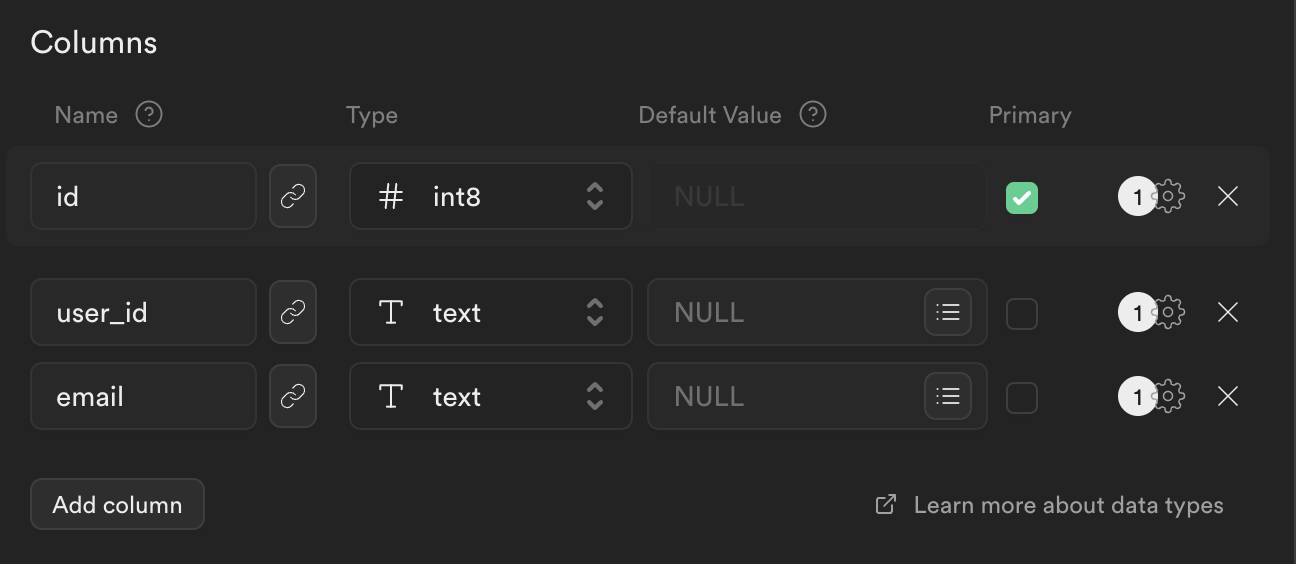
- ‘user_id’ (to match Hanko’s user ID)
- ‘email’ (to store user email addresses)
Configure environment variables
In your project dashboard, go to ‘Project Settings’ > ‘API’. Copy the ‘URL’ and ‘service_role’ key, then add them to your .env.local file.NEXT_PUBLIC_HANKO_API_URL=https://f4****-4802-49ad-8e0b-3d3****ab32.hanko.io
NEXT_PUBLIC_SUPABASE_PROJECT_URL=YOUR_SUPABASE_PROJECT_URL
SUPABASE_SERVICE_ROLE_KEY=YOUR_SUPABASE_SERVICE_ROLE_KEY
Install Supabase JavaScript Client
Add the Supabase client library to your application (assuming Hanko Auth is already configured).npm install @supabase/supabase-js
Set up Supabase Client
import { createClient } from "@supabase/supabase-js";
export const supabase = createClient(
process.env.NEXT_PUBLIC_SUPABASE_PROJECT_URL!,
process.env.SUPABASE_SERVICE_ROLE_KEY!
);
Create user synchronization API
Build an API endpoint to sync user data between Hanko and Supabase.app/api/create-user/route.ts
import { NextResponse } from "next/server";
import { supabase } from "@/lib/supabase";
export async function POST(req: Request, res: Response) {
try {
const user = await req.json();
if (!user) {
return new NextResponse("Unauthorized", { status: 401 });
}
let supauser;
try {
const { data, error } = await supabase
.from("users")
.select("*")
.eq("user_id", user.id)
.single();
if (error) {
console.error(error);
}
supauser = data;
if (!supauser) {
const { data, error } = await supabase
.from("users")
.insert([{ user_id: user.id, email: user.email }]);
if (error) {
console.error(error);
}
supauser = data;
}
} catch (error) {
console.error(error);
}
const user_data = {
...user,
id: supauser?.id,
};
return new NextResponse(JSON.stringify(user_data), { status: 200 });
} catch (error) {
console.error("[CREATEUSER_ERROR]", error);
return new NextResponse("Internal Error", { status: 500 });
}
}
Integrate with HankoAuth component
Modify your Hanko authentication component to automatically sync user data when onSessionCreated triggers.components/hanko/HankoAuth.tsx
"use client";
import { useEffect, useCallback, useState } from "react";
import { useRouter } from "next/navigation";
import { register, Hanko } from "@teamhanko/hanko-elements";
const hankoApi = process.env.NEXT_PUBLIC_HANKO_API_URL || '';
export default function HankoAuth() {
const router = useRouter();
const [hanko, setHanko] = useState<Hanko>();
useEffect(() => setHanko(new Hanko(hankoApi)), []);
const redirectAfterLogin = useCallback(() => {
// successfully logged in, redirect to a page in your application
router.replace("/dashboard");
}, [router]);
useEffect(
() =>
hanko?.onSessionCreated(async () => {
const user = await hanko.user.getCurrent()
const fetchData = async () => {
if (!user) {
console.error('No user data')
return
}
try {
const response = await fetch('/api/create-user', {
method: 'POST',
body: JSON.stringify(user),
})
if (!response.ok)
throw new Error(`HTTP error! status: ${response.status}`)
} catch (error) {
console.error('Fetch Error: ', error)
}
}
await fetchData()
redirectAfterLogin();
}),
[hanko, redirectAfterLogin]
);
useEffect(() => {
register(hankoApi).catch((error) => {
console.error(error);
});
}, []);
return <hanko-auth />;
}
Try it yourself
Supabase example with Nextjs
Full source code available on our GitHub